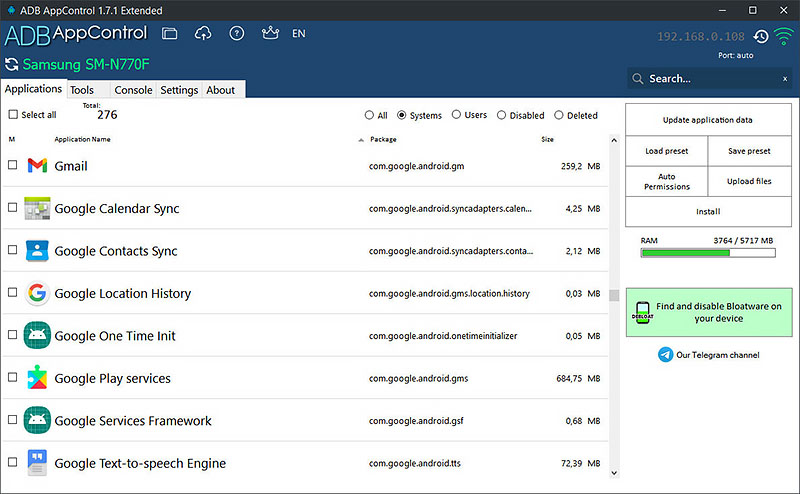
I originally made this tool for myself to handle my Android devices more efficiently. I’m sharing it here in case anyone else finds it useful!
To use this, you just need:
- Python 3 (installed on your PC).
- ADB Platform Tools (ensure
adbis in your system environment variables/PATH). - scrcpy (only if you want to use the screen mirroring feature).
No extra Python libraries (pip install) are required—it runs straight out of the box!"
#!/usr/bin/env python3
import tkinter as tk
from tkinter import ttk, scrolledtext, messagebox, filedialog, simpledialog
import subprocess
import threading
import os
import re
import shutil

class AndroidToolkitPro:
    def __init__(self, root):
        self.root = root
        self.root.title("Android Toolkit Pro")
        self.root.geometry("900x750")
        self.root.configure(bg='#1e1e1e')

        self.connected_device = None
        self.all_packages = []

        # Style configuration
        style = ttk.Style()
        style.theme_use('clam')
        style.configure('TButton', background='#0d7377', foreground='white', borderwidth=0, font=('Arial', 10))
        style.map('TButton', background=[('active', '#14a085')])
        style.configure('Danger.TButton', background='#d32f2f', foreground='white')
        style.map('Danger.TButton', background=[('active', '#f44336')])
        style.configure('TLabel', background='#1e1e1e', foreground='#ffffff')
        style.configure('TFrame', background='#1e1e1e')
        style.configure('TLabelframe', background='#1e1e1e', foreground='#ffffff')
        style.configure('TLabelframe.Label', background='#1e1e1e', foreground='#ffffff')

        self.create_widgets()
        self.scan_devices()

    def create_widgets(self):
        title_frame = ttk.Frame(self.root)
        title_frame.pack(pady=10, padx=10, fill='x')
        ttk.Label(title_frame, text="🔧 Android Toolkit Pro", font=('Arial', 18, 'bold')).pack()

        device_frame = ttk.LabelFrame(self.root, text="📱 Device Connection", padding=10)
        device_frame.pack(pady=5, padx=20, fill='x')

        self.status_label = ttk.Label(device_frame, text="No device connected", font=('Arial', 10, 'bold'))
        self.status_label.pack(side='left', padx=10)

        ttk.Button(device_frame, text="🔍 Scan Devices", command=self.scan_devices).pack(side='left', padx=5)
        ttk.Button(device_frame, text="🛠️ Check Environment", command=self.check_env).pack(side='left', padx=5)

        self.notebook = ttk.Notebook(self.root)
        self.notebook.pack(pady=10, padx=20, fill='both', expand=True)

        # Tabs
        self.quick_tab = ttk.Frame(self.notebook)
        self.package_tab = ttk.Frame(self.notebook)
        self.files_tab = ttk.Frame(self.notebook)
        self.advanced_tab = ttk.Frame(self.notebook)

        self.notebook.add(self.quick_tab, text="⚡ Quick Actions")
        self.notebook.add(self.package_tab, text="📦 Package Manager")
        self.notebook.add(self.files_tab, text="📂 Files")
        self.notebook.add(self.advanced_tab, text="🔧 Advanced")

        self.setup_quick_tab()
        self.setup_package_tab()
        self.setup_files_tab()
        self.setup_advanced_tab()

        # Console
        console_frame = ttk.Frame(self.root)
        console_frame.pack(pady=10, padx=20, fill='both', expand=True)
        self.output_text = scrolledtext.ScrolledText(console_frame, height=8, bg='#2b2b2b', fg='#00ff00', font=('Consolas', 9))
        self.output_text.pack(fill='both', expand=True)
        ttk.Button(self.root, text="Clear Output", command=lambda: self.output_text.delete(1.0, tk.END)).pack(pady=5)

    def setup_quick_tab(self):
        frame = ttk.LabelFrame(self.quick_tab, text="Screen & Info", padding=10)
        frame.pack(pady=10, padx=10, fill='x')
        ttk.Button(frame, text="🚀 Start Mirror (scrcpy)", command=self.start_scrcpy).pack(side='left', padx=5)
        ttk.Button(frame, text="📸 Screenshot", command=self.take_screenshot).pack(side='left', padx=5)
        ttk.Button(frame, text="🔋 Battery Info", command=self.battery_info).pack(side='left', padx=5)

    def setup_package_tab(self):
        ttk.Label(self.package_tab, text="Search:").pack(pady=5)
        self.search_var = tk.StringVar()
        ttk.Entry(self.package_tab, textvariable=self.search_var).pack(fill='x', padx=20)

        self.pkg_listbox = tk.Listbox(self.package_tab, bg='#2b2b2b', fg='white', font=('Consolas', 9))
        self.pkg_listbox.pack(fill='both', expand=True, padx=20, pady=5)

        btn_frame = ttk.Frame(self.package_tab)
        btn_frame.pack(pady=5)
        ttk.Button(btn_frame, text="🔄 Load Apps", command=self.load_packages).pack(side='left', padx=5)
        ttk.Button(btn_frame, text="🗑️ Uninstall Selected", style='Danger.TButton', command=self.uninstall_selected).pack(side='left', padx=5)

    def setup_files_tab(self):
        frame = ttk.Frame(self.files_tab, padding=10)
        frame.pack(fill='x')
        ttk.Button(frame, text="📥 Pull File", command=self.pull_file).pack(pady=5, fill='x')
        ttk.Button(frame, text="📤 Push File", command=self.push_file).pack(pady=5, fill='x')

    def setup_advanced_tab(self):
        frame = ttk.Frame(self.advanced_tab, padding=10)
        frame.pack(fill='x')
        ttk.Button(frame, text="🔄 Reboot System", command=lambda: self.run_adb_command("adb reboot")).pack(pady=5, fill='x')
        ttk.Button(frame, text="💤 Reboot Recovery", command=lambda: self.run_adb_command("adb reboot recovery")).pack(pady=5, fill='x')
        ttk.Button(frame, text="💻 Open Shell", command=self.open_shell).pack(pady=5, fill='x')

    def run_adb_command(self, cmd):
        def run():
            try:
                res = subprocess.run(cmd, shell=True, capture_output=True, text=True)
                self.append_output(f"$ {cmd}\n{res.stdout}{res.stderr}")
            except Exception as e:
                self.append_output(f"Error: {str(e)}")
        threading.Thread(target=run, daemon=True).start()

    def scan_devices(self):
        res = subprocess.run("adb devices", shell=True, capture_output=True, text=True)
        lines = res.stdout.strip().split('\n')[1:]
        devices = [l.split('\t')[0] for l in lines if '\tdevice' in l]
        if devices:
            self.connected_device = devices[0]
            self.status_label.config(text=f"✅ Connected: {self.connected_device}", foreground='#00ff00')
        else:
            self.status_label.config(text="❌ No Device Found", foreground='#ff0000')

    def check_env(self):
        adb = shutil.which("adb")
        scrcpy = shutil.which("scrcpy")
        msg = f"ADB: {'✅' if adb else '❌'}\nScrcpy: {'✅' if scrcpy else '⚠️'}"
        messagebox.showinfo("Env Check", msg)

    def start_scrcpy(self):
        if shutil.which("scrcpy"):
            subprocess.Popen("scrcpy", shell=True)
        else:
            messagebox.showerror("Error", "scrcpy not found in PATH")

    def take_screenshot(self):
        save_path = filedialog.asksaveasfilename(defaultextension=".png")
        if save_path:
            self.run_adb_command(f"adb shell screencap -p /sdcard/s.png && adb pull /sdcard/s.png \"{save_path}\"")

    def battery_info(self):
        self.run_adb_command("adb shell dumpsys battery")

    def load_packages(self):
        res = subprocess.run("adb shell pm list packages", shell=True, capture_output=True, text=True)
        pkgs = [line.replace("package:", "") for line in res.stdout.splitlines()]
        self.pkg_listbox.delete(0, tk.END)
        for p in sorted(pkgs): self.pkg_listbox.insert(tk.END, p)

    def uninstall_selected(self):
        sel = self.pkg_listbox.get(tk.ACTIVE)
        if sel and messagebox.askyesno("Confirm", f"Uninstall {sel}?"):
            self.run_adb_command(f"adb shell pm uninstall --user 0 {sel}")

    def pull_file(self):
        rem = simpledialog.askstring("Input", "Remote path (e.g. /sdcard/file.txt):")
        if rem:
            loc = filedialog.askdirectory()
            if loc: self.run_adb_command(f"adb pull \"{rem}\" \"{loc}\"")

    def push_file(self):
        loc = filedialog.askopenfilename()
        if loc:
            rem = simpledialog.askstring("Input", "Destination (e.g. /sdcard/):")
            if rem: self.run_adb_command(f"adb push \"{loc}\" \"{rem}\"")

    def open_shell(self):
        if os.name == 'nt':
            subprocess.Popen("start cmd /k adb shell", shell=True)
        else:
            self.run_adb_command("adb shell")

    def append_output(self, text):
        self.output_text.insert(tk.END, text + "\n" + "-"*30 + "\n")
        self.output_text.see(tk.END)

if __name__ == "__main__":
    root = tk.Tk()
    app = AndroidToolkitPro(root)
    root.mainloop()
Let me know if you like it or not, or if there are any bugs you run into!