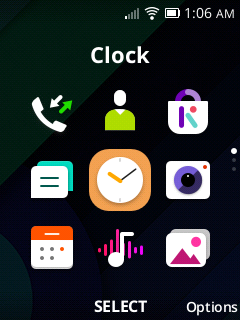
Here is an android launcher I made modeled after kaiOS.
Screenshots
It still has some rough edges and needs polishing off, but overall this is the most complete launcher we have for Android flip phones.
Definitely deserves its own topic.
Thank you! I’m glad you like it! Please let me know what I can change, I no longer have a KaiOS phone so I’ve done most from memory and screenshots online (few exist).
If anyone could send screenshots from KaiOS that’d be amazing! Also, I’m trying to locate more KaiOS app icons so I can add them to the theme as well.
I’m looking for people to submit lists of app IDs for default apps on their Android devices so I can have them be themed to KaiOS when applied by the user all in one go.
I plan on making “ports” of other apps and functionalities if anyone would appreciate that.
That’s not a big issue, you can get one for less then $20 if you want cause nobody wants to buy a KaiOS phone 
I have a KaiOS phone so later this week i’ll try sending some screenshots
I tested it on my Kyocera DuraXe e4830, it’s very good.
I think it’s the first one I tried that integrates the dialer in the way it should be.
Some things that should be fixed:
Just tested it on the Schok Classic, works excellent but in the next release, try making the apps list go more then 3 lines cause it looks weird
What’s your screen resolution? For me it shows 5 apps on the home screen. My resolution is 400x300. Can you send a screenshot?
EDIT: I will upload new APK soon with better scaling for more devices on the Home Screen.
Do you mean like a larger grid in the app grid list instead of 3x3?
There aren’t notification dots in this version, only the counter on the home screen. I’ll get those out in alpha 3 tonight or tomorrow.
Would you like it to have 4 rows when the screen is taller?
All of these should be fixed on the latest build.
I am just happy to see more DPAD apps. Good stuff.
Beautiful, the app is a lot more usable now, and is already better than most dumbphones stock launcher.
Some tweaks it still needs:
@PodLP reverse engineered the proprietary APIs of a bunch of flip phones, allowing his app to integrate with their navigation bars, native dialogs, and other system components.
It’s a major enhancement for any dumbphone app, especially one as a prominent as a launcher.
Maybe try getting the code for it from him.
Try this build lmk how it works, I rewrote the app icon sizing and grid functionality.