Thanks! I realized that it’s free returns, so I will probably buy it and if I can’t fix it then return it lol…
1 Like
Looking to buy a new Kyocera as my primary phone, Are any of the newer models better then the e4610?
E4810 has a c type port.
I want to know about the quality
e4610 is better quality then the e4810, though it’s good quality compared to other cheap flip phones.
just fyi, the messaging app on 810 is very uncomfortable to use…
1 Like
You can use Message+ on the E4810 instead.
Install Message+ APK
Disable stock messaging app - adb shell pm disable-user com.android.mms
Replace the menu icon
3 Likes
It seems like you managed to get this hebrew keyboard to work and are just having a problem with the t9. I have an E4810 I installed the app and ran the adb command, but whenever I try to switch to the hebrew keyboard by long pressing the # nothing happens. any ideas that can help me? Thanks
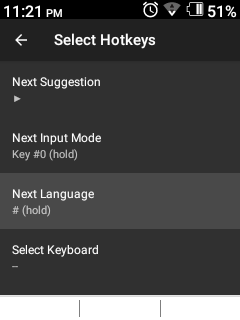
The # key is the default setting for switching the keyboard and I tried changing the setting for other keys and it still didn’t work. I’m looking at your screenshot and I have no idea where that page is. When I go the the app in business tools it it tells you what keys to press to make it work and settings to switch the key.
Are you using Traditional T9?
Which version?
I used every typing setting on the phone, t9 and without t9 and it didn’t work. I have the kyocera e4810
Kyocera and LG phones don’t work well with other T9 apps, only the ones that come with the phone
Doesn’t always install nicely. I’ve tried on multiple E4810s. Not all of them installed nicely. If you have a working APK, feel free to share it.
What does “install nicely” mean"
Not every E4810 that I tried to install the Message+ APK worked; some of them nothing changed after installing it.
Hi, anyone have the auto reply text app similar to what TAG uses for the Kyocera 4810? It’s for when the texting is blocked and replies automatically that this phone can’t receive texts, please call.
I don’t know what Tag uses but I’ve used Auto Away on the 4810 and if you switch the theme to dark mode it works fairly well with D-Pad navigation. It was usually on F-Droid but I can’t find it on there any more.
autoaway.apk (111.4 KB)
Thank you, I really appreciate it! I eventually figured it out and it seems to work great.
1 Like
I’m guessing you’re meaning because sometimes the 4810 takes a long time to open the message app? I agree, but what I learned to do is just hit clear twice when you’re done texting instead of just closing the phone and next time it almost always opens just like it should.